Sonic the Hedgehog
(Current scale is below 100% - zoom in to view full detail)
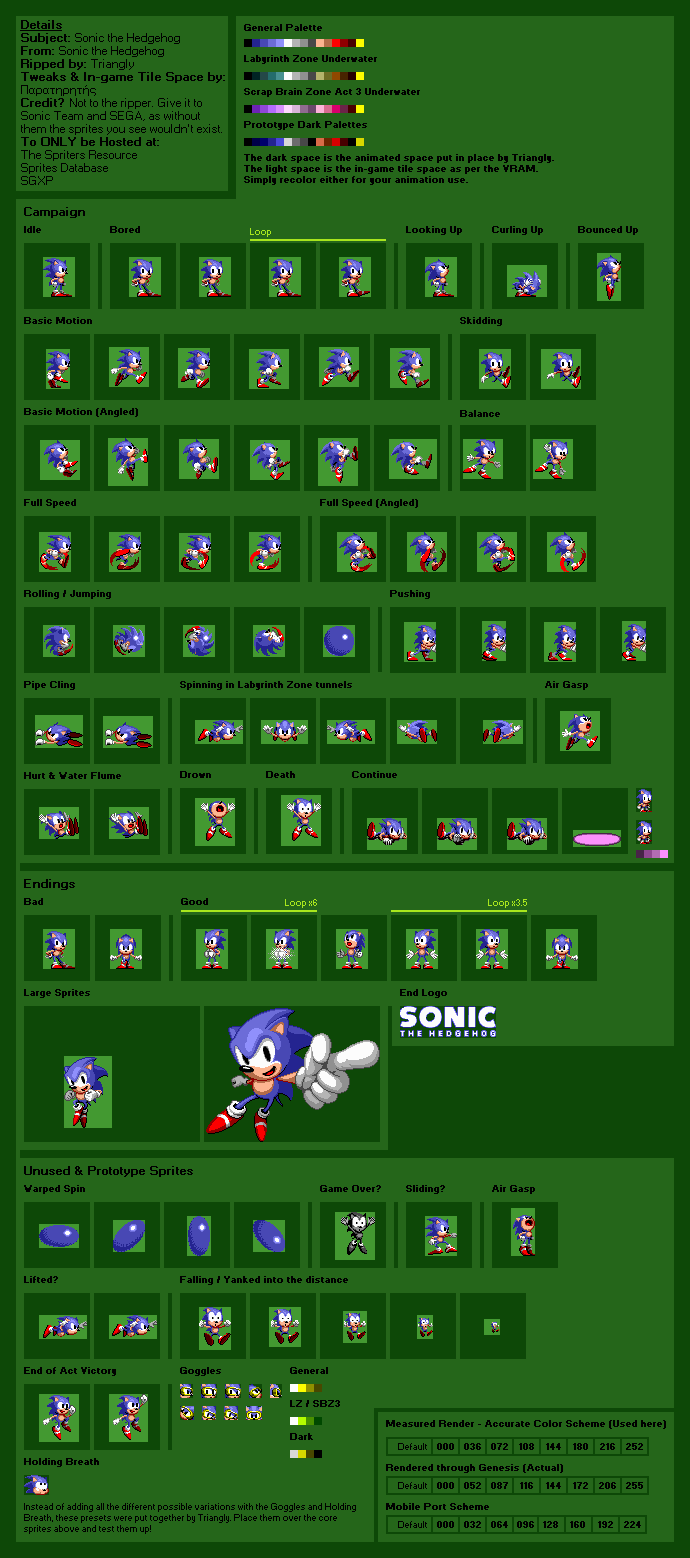
| Asset Info favorite | |
|---|---|
| Name | Sonic the Hedgehog |
| Category | Sega Genesis |
| Game | Sonic the Hedgehog |
| Section | Playable Characters |
| Submitted | A long, long time ago |
| Uploaded By | Triangly |
| Additional Credits | Paraemon |
| Size | 106.50 KB (690x1558) |
| Format | PNG (image/png) |
| Hits | 366,067 |
| Tags (3): | |
Animated GIFs (7)
Sonic Continue

Sonic Jog

Sonic Jog Angled

Sonic Jump

Sonic Run

Sonic Run Angled

Sonic Tunnel

Comments (136)
You must be logged in to post comments.

Vista. I don't like the ones that came after it.

last question which version of paint do you use to do this
Color selector tool, left click, color selector tool, right click. Edit colors. Select All, Cut. Paint bucket tool. Left click. Paste with transparency active. Instant color change.
so how do you set the scheme
Paint.
so what program did you use to covert 9-bit to 24 bit

@croissant that could've been it. a firey death from flame projectiles was probably planned, but was cut. This was probably the inspiration for Crash's insane amount of death animations in his series, considering that the working title for it was "Sonic's Ass Game".

I personally think the black death sprite would be used if sonic died to the lava in Marble Zone

I agree with this man, though, not all of them are like that... then there's the... other... part... \/

I swear, Sonic fans are the whiniest people on the planet.


nah its laziness. how come every other sprite is able to have the stripes? how come they came back in sonic 2
they just forgot to put the stripe on
they just forgot to put the stripe on
Not laziness, rather trying to cut corners. Majority of the game's objects share the same color palette to save time so that they could meet the deadline. Why in Mega Man 1 on the NES, everyone practically used the Red, White, and Yellow color scheme that isn't the player character and Ice Man on the NES side of things.

@Παρατηρητής Especially in Sonic 3.

This is basically 9bit to 24bit RGB shifting. MegaDrive hardware actually uses 9bit RGB colours (aka RAW scheme) but to display it, it has to be shifted to 24bit RGB on the screen, i.e. 3bit per colour -> 8bit per colour resulting a "Measued Render" scheme. A lot of emulators still display a RAW scheme image because of the old (incorrect) method of bit shifting (some of them shifting from 4bits to 8bits iirc, resulting a FSH scheme with 238/238/238 white colour). On the actual hardware colours become kinda "washed out" because it doesn't shift colours at linear scale. Although, the RAW scheme is still technically correct because that's how the sprites are stored deep in the game/hardware.
Just want to notice this is a very simple explanation and it might be not that correctly, but whatever
Just want to notice this is a very simple explanation and it might be not that correctly, but whatever
um how do you get the "measured render - accurate color scheme" palette i cant find it anywhere
It's easy - laziness. Laziness crops up a few more times in later Genesis Sonic games.

I really don't know how they forgot to add stripes to the Spring and Fan sprites.

@pacmastermeow It's from a HUD. And yes, the HUD shares Sonic's palette.

His name under the spring bounce sprite. Also any enemy that used Sonic's palette in-game.


What's the yellow for?