Debug Tiles
(Current scale is below 100% - zoom in to view full detail)
| Asset Info favorite | |
|---|---|
| Name | Debug Tiles |
| Category | PC / Computer |
| Game | Deltarune |
| Section | Unused Content |
| Submitted | January 17, 2019 |
| Uploaded By | UndertaleFan25 |
| Additional Credits | asym |
| Size | 7.14 KB (249x439) |
| Format | PNG (image/png) |
| Hits | 15,605 |
| Tags (1): | |
Animated GIFs (0)
Comments (12)
You must be logged in to post comments.

Reply to comment by blobbychizz posted Dec 19, 2025 10:37 PM
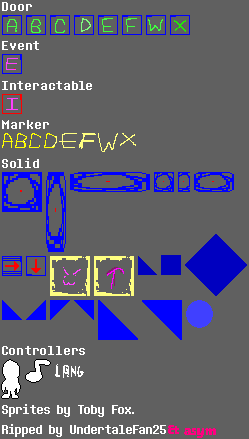
the door object is what you collide with to go to the next room, and the marker is, as the name suggests, a marker to where you should spawn in. when spawning into a room, the game checks a value to see if you warped in from another room (global.interact), and if it's true, it checks the value that the marker set (if you are going into the room right after, it would set it to 1, for example) and then check if the "markerA" object exists in the room. if it does, it just sets your x/y value to that object.
Wait, im still a lil confused, shouldnt the door object do the same thing? If mr Toby (don't call me Radiation) Radiation Fox actually coded it like that, it seems kinda silly. Unless thats the only way it can be done (in gms)
markers basically say where to spawn in the player when you enter a new room
>’.3
>:3
I understand what practically all of these are, but what do markers do?
>:3 T

>:3

>:3

Chapter 2 added redesigned versions of many of these tiles, as well as new ones

>:3

>:3